Phone Tracker GPS Location
Esame Marketing LimitedMaps & Navigation
3.769.00 Reviews
- Version
- 1.2.3
- Installs
- 10.00M
- Age Rating
- Everyone
Screenshots
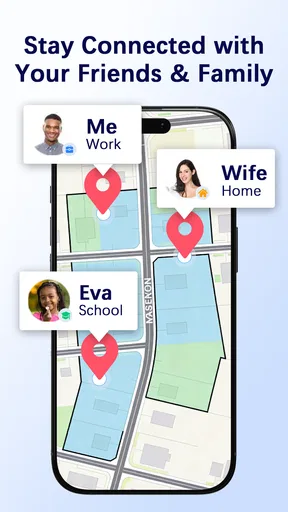
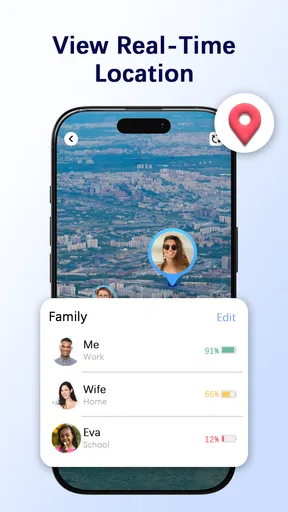
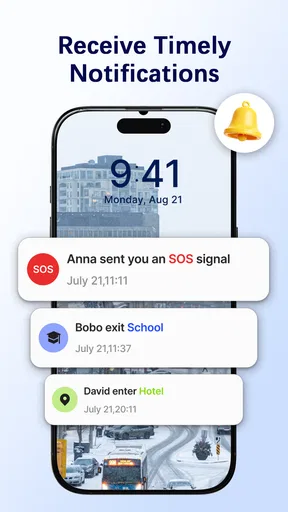
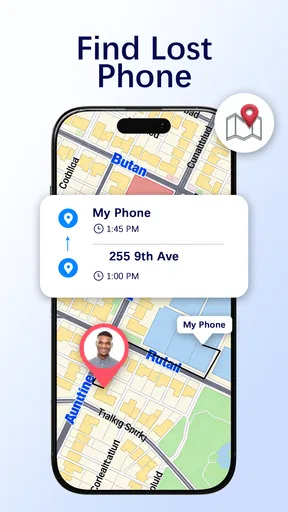
Our Review of Phone Tracker GPS Location
 Analysis by Appyee
I judge a location-sharing app less by how polished its map looks than by what happens when someone is underground, crossing a busy street, or simply has a weak signal. Phone Tracker GPS Location is aimed at keeping family and close contacts in view, so its usefulness depends on more than opening a map: the people involved need to be connected, willing to share, and comfortable with the arrangement. I’d consider it a practical coordination tool, not a substitute for checking in directly or responding to an emergency.
When a location update depends on the network
A GPS reading can be useful, but getting that information to another person is a separate step. In my view, that distinction matters with Phone Tracker GPS Location: a marker is only as reassuring as its freshness. If a contact’s phone has weak connectivity, a location may take longer to reflect where they are now. I would treat a delayed update as a prompt to ask a question, not as proof that someone is still at the last place shown.
That makes the app most useful for ordinary coordination: working out which entrance to use, finding a friend around a crowded venue, or checking whether a family member is close to a planned meeting point. It is less suitable for anyone who needs a guaranteed, uninterrupted view of another person’s movements. Network conditions, device settings, and the other person’s willingness to share all shape what you see.
How it fits into everyday mobile routines
For a realistic example, imagine a family arranging a pickup after an activity. Rather than sending repeated “Where are you?” messages, the people involved can use the location view to coordinate when they are nearby. If one phone’s position appears behind, a short message or call is still the sensible next step. The app can reduce the back-and-forth, but it cannot tell you why an update is late or whether plans have changed.
I’d also use a location-sharing app selectively instead of treating it as a constant family dashboard. Agreeing in advance who can see whom, and when sharing is useful, makes the experience clearer and less intrusive. For a one-off meetup, temporary, purpose-driven sharing is a better habit than leaving access unexplained. That is a practical privacy choice, not just a matter of app settings.
Recovery when the map seems behind
If a location does not look current, I would first check whether the person can connect and whether their phone is able to provide location information. Then I’d give the update a little time and confirm by message or call if the detail matters. This simple order avoids mistaking a connectivity hiccup for a safety problem, while still giving you a direct way to act when timing is important.
It is also worth agreeing on a backup before relying on the app for a pickup or meeting. Choose a recognizable meeting point and a simple fallback message, such as naming the entrance or nearby landmark. That is especially useful in a station, shopping area, or large event space, where a map pin can narrow the search but may not explain which side of a building someone is on.
Sharing with care
Location information is personal, so I would only use this kind of tracker with people who understand what is being shared and agree to it. It works best as a mutual convenience between trusted contacts, not as a way to monitor someone without their knowledge. Families can explain the purpose in plain language and revisit the arrangement as children grow or routines change.
There is also a small but important distinction between keeping a location available and needing to know it. If nobody has a practical reason to check the map during a particular part of the day, there is little value in making location checks a habit. I find the healthiest approach is to use the app to solve a concrete coordination problem, then return to normal communication rather than letting the map become a constant measure of trust.
Who will get the most from it
I’d recommend considering Phone Tracker GPS Location if you regularly coordinate with a close group and everyone is happy to share their whereabouts for practical reasons. It may suit families arranging pickups, partners coordinating a late commute, or friends trying to meet in an unfamiliar part of town. The value is less about watching a moving dot and more about reducing avoidable calls when people are trying to get to the same place.
It is probably not the right fit if you want a private navigation tool for your own trips, or if the people you need to locate do not want to participate. A conventional maps app is the better choice for directions and route planning; a phone’s built-in location-sharing option may also be more convenient for a group already using the same platform. If your priority is simply telling someone you are safe, a text or call can be clearer and less demanding than keeping a shared location view open.
Compared with those usual alternatives, a dedicated phone tracker makes sense only when its particular sharing workflow is useful to the people involved. I would not install it expecting it to replace maps, messaging, or emergency services. Think of it as one tool in a small routine: use the map to orient yourself, contact the person when details are unclear, and keep a fallback plan for situations where connectivity is poor.
There are a few practical questions I would settle before relying on it. Who is expected to share a location, and for what purpose? What should everyone do when a marker appears stale? Is a familiar meeting point available if the app cannot help? Answering those questions in advance prevents the awkward situation where one person assumes the map is live while another thought sharing was only for a short trip.
Phone Tracker GPS Location is a free app in the maps and navigation category from Esame Marketing Limited. It is rated for everyone, has a 4.0 average from around 2.3 thousand ratings, and has passed one million installs. Version 1.1.5 is listed for devices running Android 7.0 or later, with in-app purchases ranging from $2.99 to $9.99 per item. I see those details as context for deciding whether to try it, rather than a reason to assume it will suit every household.
My overall advice is to try it only if the people you want to coordinate with are on board and you have a clear use for shared locations. Keep expectations realistic: network-dependent updates can help with everyday meetups, but they do not guarantee an exact, always-current picture. Used with consent and a simple backup plan, it can make ordinary coordination easier; if you need directions, private navigation, or dependable emergency response, another tool is a better match.
Ever had that moment where you're trying to meet up with a friend in a bustling city, but neither of you can figure out where the other is? Enter the Phone Tracker GPS Location app, a nifty tool designed to make those frustrating moments a thing of the past. This app has become my go-to for keeping tabs on loved ones without the hassle of endless texts and calls. Let me walk you through my experience with it.
Why I Decided to Try It Out
I've always been a bit of a tech enthusiast, and I'm particularly fond of apps that aim to simplify life. When I first stumbled upon Phone Tracker GPS Location, I was intrigued. With promises of real-time location tracking, it seemed like a perfect fit for coordinating meet-ups and ensuring the safety of family members. Plus, with the increasing need for security these days, having an app that could provide peace of mind was definitely appealing.
Getting Started: Setup and First Impressions
Setting up the app was a breeze. After downloading it from the app store, I was greeted with a user-friendly interface that guided me through the initial setup process. All it took was a few taps to get everything up and running. I was impressed by how intuitive the design was, making it accessible even for those who might not be as tech-savvy.
The app required access to my phone's GPS, which is pretty standard for location tracking apps. Once permissions were granted, I was ready to explore its features. Right off the bat, I could see the potential for this app to become an essential tool for families and friends alike.
Features That Stood Out
One of the standout features is the real-time location tracking. With this, I could see exactly where my friends and family were at any given time. The accuracy was impressive, pinpointing locations with remarkable precision. This feature alone made it worth the download for me.
Another cool feature is the location history. This allows you to see where someone has been over a certain period, which can be handy for planning future meet-ups or just keeping tabs on your own movements. I found it fascinating to look back and see a timeline of places I’d visited throughout the week.
The app also offers geofencing, which was a pleasant surprise. This feature lets you set up specific zones, and you'll receive notifications whenever someone enters or leaves these areas. It's perfect for keeping track of kids or even just ensuring that your partner made it home safely.
Everyday Use: My Personal Experience
Using the app in my daily life has been smooth sailing. Whether I'm coordinating with friends for a night out or making sure my partner gets home safely from work, the app has been a reliable companion. I particularly appreciate the low battery consumption, as I was initially worried about the app draining my phone's battery. Thankfully, it runs efficiently in the background without any noticeable impact on battery life.
Communication with the app is also seamless. There's a built-in messaging feature that lets you chat directly with your contacts within the app. It’s a nice touch that keeps everything in one place, eliminating the need to switch between different apps.
Room for Improvement
While the app is generally excellent, there's always room for growth. I did notice that sometimes the location updates could lag slightly, especially in areas with poor network coverage. However, this is a minor issue that doesn't detract significantly from the overall experience.
Another potential improvement could be the addition of more customizable alerts. While the existing notifications are useful, having more options to tailor these alerts to specific needs would be a welcome enhancement.
Final Thoughts
Overall, the Phone Tracker GPS Location app has exceeded my expectations. It's a reliable, user-friendly tool that offers peace of mind and convenience. Whether you're concerned about safety or just want an easier way to coordinate with friends, this app is definitely worth checking out.
With its array of features and intuitive design, it's a valuable addition to any smartphone. I can confidently say that it has become a staple in my app collection, and I highly recommend giving it a try.
Privacy and Permissions
See what permissions an app requests and how it handles your data.
- Identity
- find accounts on the device
- Contacts
- find accounts on the device, read your contacts
- Location
- approximate location (network-based), precise location (GPS and network-based)
- Microphone
- record audio
- Wi-Fi connection information
- view Wi-Fi connections
- Other
- view network connections, create accounts and set passwords, full network access, change your audio settings, read sync settings, run at startup, control vibration, prevent device from sleeping, toggle sync on and off, Google Play license check
Verdict
Strengths of Phone Tracker GPS Location
- Accurate real-time location updates.
- User-friendly interface for all ages.
- Low battery consumption feature.
- Works well in remote areas.
- Customizable alerts and notifications.
Limitations of Phone Tracker GPS Location
- Requires constant internet connection.
- Privacy concerns for tracked users.
- Limited offline functionality.
- Ads can be intrusive at times.
- Subscription required for premium features.
Similar Picks in This Category
View All
Uber - Request a ride
Uber Technologies, Inc.4.7


inDrive. Rides with fair fares
® SUOL INNOVATIONS LTD4.8

Yandex Go: Taxi Food Delivery
Mikromobilnost LLC Belgrade4.8

Bolt: Request a Ride
Bolt Technology4.8

Rapido: Bike-Taxi, Auto & Cabs
Rapido Bike Taxi4.8
Frequently Asked Questions
What is Phone Tracker GPS Location?
Phone Tracker GPS Location is an app designed to help users track the real-time location of their phones or other devices. It's particularly useful for keeping an eye on family members or ensuring you don't lose your device. The app uses GPS technology to provide accurate location updates.
Is Phone Tracker GPS Location free to use?
Phone Tracker GPS Location offers both free and premium versions. The free version includes basic tracking features, while the premium version provides advanced options like location history, geofencing, and ad-free usage. Users can choose the version that best suits their needs after downloading the app.
How accurate is the location tracking?
The accuracy of Phone Tracker GPS Location largely depends on the GPS capabilities of the device and the quality of the network connection. Generally, the app can provide location data accurate to within a few meters. However, accuracy may decrease in densely built-up areas or when the device has a weak GPS signal.
Can I share my location with others using this app?
Yes, Phone Tracker GPS Location allows you to share your real-time location with family and friends. You can set permissions for who can see your location and when, ensuring your privacy is maintained while providing peace of mind to your loved ones.
Does the app affect battery life significantly?
Using GPS tracking can impact battery life, but Phone Tracker GPS Location is optimized to minimize this effect. The app runs efficiently in the background, using minimal resources. Users can further manage battery usage by adjusting location update intervals and turning off tracking when not needed.
